Best Vimeo Alternatives for Paid Communities & Memberships (2026)

Vimeo's 2025–2026 pricing overhaul hit paid community operators hardest: the features you actually need; domain-restricted embeds, password-protected links, ad-free playback are now locked behind plans that start at $300+/year. If your membership site or cohort-based community relies on gated video, you're paying enterprise prices for a creator tool that was never designed for you. Here are the top Vimeo alternatives for paid communities in 2026.
A quick disclosure: Livid publishes this guide, and Livid is one of the platforms reviewed. We've done our best to evaluate every option honestly against the same criteria. You'll see where we fall short, too.
Why Paid Community Operators Are Leaving Vimeo in 2026
The generic "Vimeo got expensive" complaint misses why this hurts community builders specifically. It's not just about price, it's about which features got pushed behind the paywall.
Domain-restricted embedding, the single most important security feature for anyone selling access to video content, now requires Vimeo's Advanced plan. Password protection on individual videos? Same story. If you're running a membership site with tiered access and gated video modules, the plan you actually need starts at $300+/year and scales steeply from there.
Then there's the Vimeo OTT shutdown. Community operators who built standalone video experiences on Vimeo's OTT platform were essentially told to pack up and leave. That product no longer exists in its original form, and there's no migration path built for you.
Vimeo also offers zero member-level analytics. You can see aggregate view counts, but you can't tell which members watched which videos, how far they got, or whether your newest cohort actually completed the onboarding module. For a marketing team, aggregate data is fine. For a community operator trying to reduce churn, it's useless.
And with Bending Spoons now running the show, the trajectory is clear. They acquired StreamYard in 2024, gutted the team, and raised prices aggressively. We know this playbook because several of us lived through it. Expect Vimeo's prices to keep climbing while the product keeps shrinking.
What Paid Communities Actually Need From Video Hosting
Before we get to the list, let's define what "good video hosting" actually means when you're running a paid community. The criteria are different from what a YouTuber or a marketing team needs, and every other comparison article out there ignores this.
1. Domain Locking
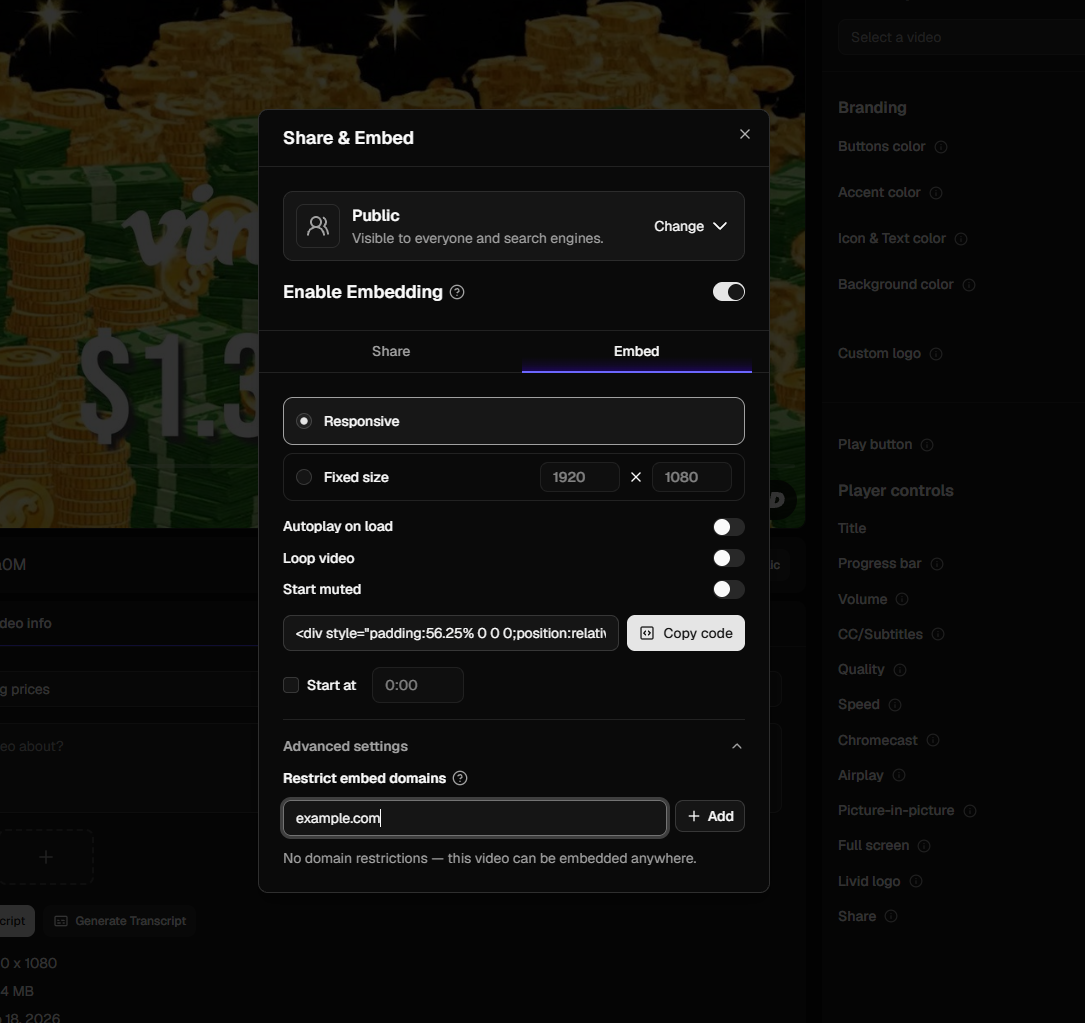
This is the single most important security feature for paid content. Domain locking restricts your video embeds so they only play on your specific domain. If someone copies the embed code and pastes it on their own site, it won't work. Without this, anyone who views your source code can redistribute your videos.
2. Password-Protected Sharing
For tiered communities, you need the ability to set different passwords on different videos or collections. This lets you gate content by membership level without building a custom authentication layer. It's not a replacement for your membership platform's access controls, but it's a critical second layer.
3. Ad-Free, Brandable Player
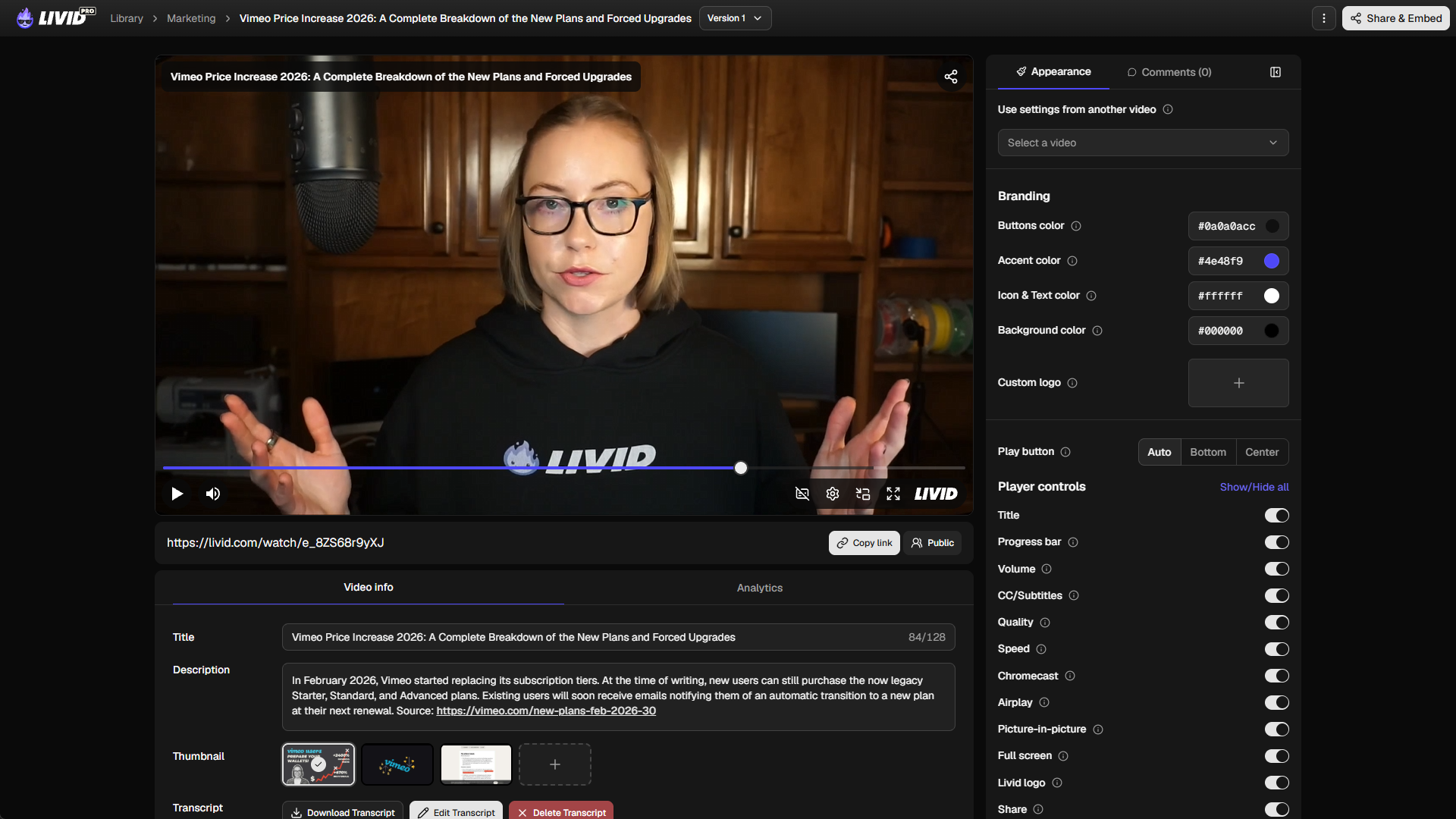
If your members see a "Watch on Vimeo" logo or, worse, an ad for someone else's product, you've just undermined the premium experience they're paying for. You need a clean, customizable player that looks like it belongs on your site.
4. Easy Embedding on Any Membership Platform
Whether you're on WordPress with MemberPress, Kajabi, Circle, Skool, or Teachable, your video hosting needs to drop in without friction. Standard embed codes and responsive players aren't a nice-to-have, they're the baseline. If embedding requires a developer, it's not built for you.
5. Migration Tooling
You probably have dozens (or hundreds) of videos on Vimeo right now. Moving platforms shouldn't mean manually downloading and re-uploading every file, re-setting every privacy rule, and re-building every folder structure. A real migration tool handles this for you.
6. Affordable Pricing That Doesn't Penalize Success
This is the one that burns the most. You launch a new cohort, 200 members start streaming your content in the first week, and suddenly you're hit with a bandwidth overage charge. Your hosting costs should be predictable and should scale reasonably, not punish you for actually having an engaged community.
The 7 Best Vimeo Alternatives for Paid Communities, Ranked
We've excluded ad-supported platforms (YouTube, Dailymotion) because they fundamentally fail the paid community criteria. Ads in your premium content and zero privacy controls make them non-starters. We've also excluded all-in-one community platforms like Kajabi and Mighty Networks from this list. They're community tools that happen to host video, not video hosting built for communities. We'll talk about hybrid stacks later.
Here are the platforms that actually make sense for membership site video hosting.
1. Livid: Best for Community Operators Who Need Private, Embeddable Video Without the Complexity
Starting price: $10/month ($16 if paid monthly) · See all plans
Best for: Membership site operators, course creators, cohort-based communities
Livid was built by the team that Bending Spoons fired when they acquired StreamYard. We know what it feels like to watch a good product get gutted, and we built Livid so community builders would have somewhere to go.
What it does well: Domain locking and password protection are included on the Pro plan, not locked behind a $300+/year tier. The player is fully brandable with no Livid logo unless you want one. Embed codes are standard and work on WordPress, Kajabi, Circle, Squarespace, and basically anything that accepts an iframe. The LOVE migration tool (Livid One-click Video Exporter) pulls your entire Vimeo library, including folder structure and privacy settings, in one click. And if you're still mid-Vimeo-contract, Livid will credit your remaining subscription months.
Storage is 2TB with 3TB bandwidth on Pro, which is generous enough that a cohort launch won't trigger overage anxiety.
What it doesn't do: Livid is video hosting, not a community platform. You'll use it alongside Circle, Skool, or whatever you're running your community on. It doesn't offer member-level analytics tied to individual user accounts in your community platform (yet). And there's no native API integration with Kajabi or Circle as you're embedding, not syncing.
Mobile experience: The player is responsive and adapts to mobile screens. Members watching gated content on their phones will get a clean, full-width experience without ads or third-party branding.
2. Searchie: Best for Course-Heavy Communities With Large Video Libraries
Starting price: $49/month
Best for: Community operators with extensive course catalogs who need in-video search
Searchie's standout feature is AI-powered search across your entire video library. Members can search for a keyword and jump directly to the moment in any video where it's mentioned. For communities with hundreds of hours of recorded workshops, calls, and course content, this is genuinely useful.
What it does well: Automatic transcription, in-video search, content hubs where you can organize videos into gated collections. It integrates with common membership tools and offers password-gated access. It's designed specifically for the "I have 400 hours of coaching calls" use case.
What it doesn't do: Domain locking is limited compared to dedicated video hosts. The player customization is basic. At $49/month for the starter plan, you're paying significantly more than simpler hosting solutions, and the bandwidth limits on lower tiers can bite during a launch. Video quality and playback performance aren't its primary focus — search is.
3. Uscreen: Best If You Want a Standalone OTT App
Starting price: $149/month
Best for: Community operators who want their own branded video app on Roku, Apple TV, or mobile
Uscreen is the pick if your community's primary experience is "Netflix but for my niche." It lets you build a standalone streaming app with subscriptions, free trials, and member management built in.
What it does well: Full OTT app deployment (iOS, Android, Roku, Apple TV, Fire TV). Built-in subscription management and paywall. Community features layered on top of the video experience. If you want members to open your app and browse content like a streaming service, Uscreen is purpose-built for that.
What it doesn't do: At $149/month minimum, it's expensive for operators who just need to embed videos on an existing site. It's not a great fit if you're already running your community on Circle or Skool and just need hosted video to drop in. You're paying for an entire platform, not a hosting layer. The embed-on-your-own-site workflow is secondary to the standalone app experience.
4. Wistia: Strong Analytics, Enterprise Pricing
Starting price: $79/month
Best for: Marketing teams and operators who need deep viewer analytics
Wistia has excellent video analytics: Heatmaps, engagement graphs, viewer tracking. If understanding exactly how your members interact with each video is core to your business, Wistia delivers here.
What it does well: Best-in-class analytics. Clean, brandable player. Domain restriction available. Good integration with marketing tools like HubSpot and Mailchimp. Password protection on videos. Professional-grade player customization.
What it doesn't do: $79/month for a plan capped at 500 videos is steep for community operators with large libraries. Bandwidth costs can escalate. There's no Vimeo migration tool, so you're manually downloading and re-uploading. It's built for marketing teams who host 20 carefully optimized videos, not community builders with 300 workshop recordings. The per-video economics just don't work for high-volume libraries.
5. Bunny Stream: Cheapest Raw Infrastructure
Starting price: $0.005/GB stored + $0.01/GB delivered (pay-as-you-go)
Best for: Technical operators comfortable building their own video infrastructure
Bunny Stream (by BunnyCDN) is the cheapest option by a wide margin if you're comfortable doing the setup work yourself. It's infrastructure, not a product. You get a CDN-powered video pipeline and build everything else on top.
What it does well: Absurdly cheap at scale. Token-based security for access control. Global CDN with fast delivery. API-first approach lets you build exactly what you need. If you have a developer on your team, the cost savings are real.
What it doesn't do: There's no polished player dashboard, no migration tool, no built-in domain locking UI (you'll implement it via signed URLs and referrer restrictions), and no password protection out of the box. Player customization requires code. If you're a community operator who wants to upload a video and get an embed code, Bunny Stream will feel like building your own furniture from raw lumber.
6. SproutVideo: Solid Privacy Controls, Limited Community Features
Starting price: $10/month (Seed plan)
Best for: Operators who prioritize privacy features and don't need a large library
SproutVideo has been quietly offering domain locking, password protection, and login-required viewing for years. It's a focused video hosting tool that takes privacy seriously.
What it does well: Domain restriction, password protection, and login-gated access are all available. Player customization is decent. Pricing is straightforward. It also supports video sitemaps and basic analytics.
What it doesn't do: The $10/month Seed plan has tight storage limits (500GB, 500GB bandwidth). To get the storage a growing community needs, you'll move to higher tiers quickly. No Vimeo migration tool; it's a manual process. The platform gets less attention and fewer updates than bigger competitors, which can make you nervous about long-term viability. Mobile playback is fine but the player feels a generation behind.
7. Mux: Developer-First API
Starting price: Pay-as-you-go ($0.007/min encoded + $0.00012/sec streamed)
Best for: Teams with developers who want to build a fully custom video experience
Mux is a video API. If your community platform is custom-built and you want total control over the video pipeline, encoding, delivery, player and analytics, Mux is best-in-class infrastructure.
What it does well: Extremely flexible. Excellent video quality with adaptive bitrate streaming. Signed URLs for access control. Real-time data and analytics API. Used by companies like Frame.io and Notion.
What it doesn't do: There is no dashboard for uploading and managing videos in the way a non-technical operator would expect. No built-in player (you'll use Mux Player or build your own). No migration tool. No password protection UI. For a community operator who wants to upload a coaching replay and share it with Tier 2 members, Mux is like hiring an architect when you need a handyman.
A note about hybrid stacks: Most paid community operators will pair one of these video hosting tools with a community platform like Circle, Skool, Teachable, or WordPress + a membership plugin. That's normal and honestly better than relying on an all-in-one tool that does video hosting as an afterthought. A best-of-breed stack: dedicated video hosting plus a dedicated community platform. This gives you flexibility to switch either piece without blowing up the whole setup.
Comparison Table: Features That Matter for Paid Communities
Here's how all seven stack up across the specific features that paid community operators actually need.
| Feature | Livid | Searchie | Uscreen | Wistia | Bunny Stream | SproutVideo | Mux |
|---|---|---|---|---|---|---|---|
| **Domain Locking** | ✅ | ⚠️ Limited | ✅ | ✅ | ⚠️ DIY | ✅ | ⚠️ DIY |
| **Password Protection** | ✅ | ✅ | ✅ | ✅ | ❌ | ✅ | ❌ |
| **Ad-Free Player** | ✅ | ✅ | ✅ | ✅ | ✅ | ✅ | ✅ |
| **Custom Player Branding** | ✅ | ⚠️ Basic | ✅ | ✅ | ⚠️ Code required | ✅ | ⚠️ Code required |
| **Membership Platform Compatibility** | ✅ | ✅ | ⚠️ Own ecosystem | ✅ | ✅ | ✅ | ✅ |
| **Vimeo Migration Tool** | ✅ (LOVE) | ❌ | ❌ | ❌ | ❌ | ❌ | ❌ |
| **Starting Price** | $10/mo | $49/mo | $149/mo | $79/mo | ~$1/mo* | $10/mo | ~$1/mo* |
| **Mobile-Optimized Player** | ✅ | ✅ | ✅ | ✅ | ⚠️ Depends on build | ✅ | ⚠️ Depends on build |
*Bunny Stream and Mux use pay-as-you-go pricing. The ~$1/mo estimate assumes a small library with moderate traffic. Costs scale with usage.
A note on "Membership Platform Compatibility": In this table, compatibility means the platform produces standard embed codes that work on any site that accepts iframes: WordPress, Kajabi, Circle, Squarespace, etc. It does not mean native API integrations where your membership platform talks directly to your video host to sync member access. Uscreen gets a caution mark because it's designed primarily as its own destination, not as an embed-and-forget hosting layer.
How to Protect Paid Video Content From Leaks and Piracy
If people are paying for access to your videos, you need to make it difficult enough for someone to redistribute them. You don't need a Hollywood-grade DRM system. You need the right combination of practical tools.
Domain Locking Is Your Most Important Security Feature
Domain locking (sometimes called referrer restriction or domain-restricted embedding) ensures your video player only loads on domains you've approved. Someone grabs your embed code and pastes it on a forum? The video won't play. Someone shares a direct link to the embed? It won't load outside your site.
This is the single most effective protection for gated video content because it addresses the most common leak vector: people sharing embed codes or iframe URLs. Livid's domain restriction feature lets you whitelist specific domains per video or across your entire library.
Password Protection vs. Signed URLs
Password protection puts a gate in front of the video player itself. A viewer needs to enter a password before playback begins. This is simple and effective for tiered access, like giving your premium tier a different password than your basic tier.
Signed URLs are more technical. They generate time-limited, unique links that expire after a set period or number of uses. Bunny Stream and Mux use this approach. It's more secure in theory but requires technical implementation.
For most paid community operators, password protection combined with domain locking covers the vast majority of piracy scenarios without requiring developer resources.
"Unlisted" Is Not Secure
If you're currently hosting private community videos as "unlisted" on any platform, you have a problem. Unlisted means the video won't appear in search results or on your public profile, but anyone with the direct link can watch it and share it freely. It's security through obscurity, and obscurity isn't security. Any member can copy the URL and post it anywhere.
Do You Need DRM?
Probably not. DRM (Digital Rights Management) encrypts the video stream itself and requires license-based decryption in the player. It's what Netflix uses. It's also expensive, complex, and adds latency to playback.
For a paid community or course, domain locking + password protection covers roughly 95% of realistic piracy scenarios. The remaining 5%, someone screen-recording your content, isn't stopped by DRM either. Save your money for content that actually keeps members subscribed.
How to Migrate Your Vimeo Library Without Losing Subscribers
The biggest reason community operators stay on Vimeo longer than they should is migration anxiety. You've got hundreds of videos embedded across your membership site, each one linked to a specific module or lesson. Breaking those links means broken member experiences and a flood of support tickets.
Here's how to do it without drama.
Step 1: Export Your Vimeo Library
Start with LOVE (Livid One-click Video Exporter). It's free, and it pulls your entire Vimeo library, including folder structure, video titles, descriptions, and privacy settings, into your Livid account. You don't need to manually download a single file. Here's a step-by-step walkthrough.
If you're migrating to a different platform, you'll need to use Vimeo's native download function and re-upload manually. This is tedious for large libraries, but doable.
Step 2: Re-Map Embed Codes on Your Membership Site
This is the part that takes the most time. Each video embedded on your site needs its embed code swapped to the new platform. If you're on WordPress, a search-and-replace plugin (like Better Search Replace) can update Vimeo iframe URLs to Livid ones across all posts and pages in minutes. For Kajabi or Circle, you'll update each module's embed manually.
Pro tip: do this on a staging environment or during a low-traffic window. Don't push changes live until you've tested.
Step 3: Test Gated Access Before Telling Members
Before you announce anything, log in as a test member at each tier and confirm that (a) videos play, (b) domain locking is working, (c) password protection gates the right content, and (d) the mobile experience is solid. Test on both iPhone and Android, community members are increasingly watching on their phones during commutes and lunch breaks.
Step 4: Redirect Old Links (If Applicable)
If you've ever shared direct Vimeo links in emails, Slack channels, or downloadable course guides, those links will break. You can't redirect Vimeo URLs (you don't control their domain), but you can update pinned messages, email sequences, and PDF resources over the following weeks.
One more thing: If you're still in the middle of an annual Vimeo contract, Livid will credit your remaining months. You don't have to wait for your renewal date to switch.
FAQs
Can I Use YouTube for a Paid Community?
No. YouTube injects ads (even on videos you upload), doesn't offer domain locking, and provides no password protection. Your paid members would see pre-roll ads for competitors, and anyone with the link can watch for free. It fails every criterion that matters for gated video content.
What Is Domain-Locked Video Hosting?
Domain locking restricts your embedded video so it only plays on approved websites. If someone copies your embed code and places it on another domain, the video refuses to load. It's the most effective protection against unauthorized redistribution of paid video content, and it's more practical than DRM for most community operators.
How Much Does Private Video Hosting Cost for a Membership Site?
It depends on your library size and traffic, but realistic options range from $10/month (Livid, SproutVideo) to $149/month (Uscreen). Vimeo now requires $300+/year to access the privacy features community operators need. Pay-as-you-go options like Bunny Stream can be cheaper but require technical setup.
Can I Migrate From Vimeo Without Losing My Videos?
Yes. If you migrate to Livid, the LOVE tool transfers your entire library, videos, folders, titles, privacy settings, in one click. For other platforms, you'll need to download from Vimeo and re-upload manually. The key is to swap embed codes on your membership site before deactivating your Vimeo account, so members never see a broken video.
Do I Need DRM for My Paid Community Videos?
Almost certainly not. DRM adds cost and complexity and still doesn't prevent screen recording. For paid communities and courses, domain locking combined with password protection stops the most common piracy scenarios: unauthorized re-embedding and link sharing. Save DRM for situations where you're distributing Hollywood films, not coaching replays.
What's the Difference Between Password Protection and Domain Locking?
They solve different problems. Password protection requires a viewer to enter a password before the video plays. Useful for tiered access where different membership levels get different passwords. Domain locking restricts where the video can be embedded. It won't play on any website you haven't approved. Used together, they cover both the "who can watch" and "where can it be watched" vectors.
If you're running a paid community on Vimeo and your renewal is coming up, start by exporting your library with LOVE. It's free and takes minutes to kick off. Transfer time is dependent on the size of your library. Then try Livid's Pro plan. Domain locking, password protection, and a brandable player are all included at $10/month, and we'll credit your remaining Vimeo months. Your members won't notice the switch. Your accountant will.