Vimeo Bandwidth Limits Explained: The "Success Tax" Nobody Warns You About


You launched a course, embedded your videos, and things went well. Maybe too well. Then you got the email: you've exceeded Vimeo's bandwidth threshold and need to "explore options" with their sales team. Welcome to the Success Tax, the moment Vimeo's pricing penalises you for the growth you're paying them to support.
The vimeo bandwidth limit is a 2TB monthly soft cap that applies across all self-serve plans. Most creators don't know it exists until they hit it, because Vimeo buries the specifics. This is the only third-party breakdown that combines the exact dual-trigger mechanics, real user-reported dollar amounts from forced enterprise transitions, and a concrete bandwidth calculator so you can figure out exactly when your growing audience becomes a pricing problem.
A quick disclosure: Livid publishes this guide, and Livid is one of the platforms compared later in the article. We've been upfront about our own numbers and limits throughout, because vague comparisons help nobody.
How Vimeo's Bandwidth Cap Actually Works
First, let's clarify two terms that Vimeo's marketing conveniently blurs together.
Storage is the space your uploaded files occupy on Vimeo's servers. A 10-minute 1080p video takes up roughly 1.5GB of storage, and it sits there whether anyone watches it or not.
Bandwidth is the data consumed every time someone presses play. If 100 people watch that same 1.5GB video, you've used approximately 150GB of bandwidth. Storage is a fixed cost. Bandwidth scales with your success.
Vimeo sets a 2TB monthly bandwidth threshold across all self-serve plans, from the $10/month Creator tier up through Professional. They don't charge per-GB overages on self-serve plans the way a cloud provider might. Instead, they monitor your usage and intervene when you cross the line.
Why does Vimeo have this limit at all? Because their model is ad-free. YouTube can offer unlimited bandwidth because every view generates ad revenue that subsidises CDN delivery costs. Vimeo doesn't run ads, so every gigabyte your viewers consume comes directly out of their margin.
Vimeo likes to say that "99% of users never hit the bandwidth cap." That's probably true. But it's also irrelevant to you if your videos are actually getting watched. The cap isn't designed for inactive accounts. It's designed to catch the ones that are growing.
The Two Triggers: Soft Cap vs Hard Cap
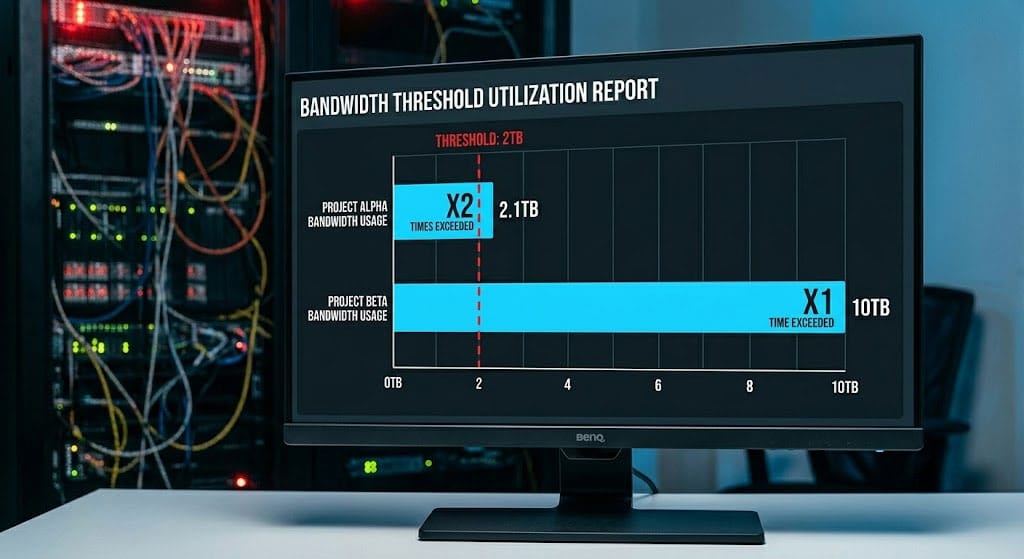
Most articles about the vimeo bandwidth limit only mention the 2TB number. They miss the fact that there are two separate enforcement mechanisms.
Soft trigger: Exceed 2TB of bandwidth in two separate months within a rolling 12-month window. It doesn't have to be consecutive months. If you spiked in January and spike again in October, that counts.
Hard trigger: Exceed 10TB of bandwidth in any single month. One big launch, one viral embed, one successful marketing push, and you've tripped this regardless of your history.
When either trigger fires, here's the sequence. You receive an email from Vimeo's "Enterprise Solutions" team informing you that your account has exceeded bandwidth thresholds. You're given approximately 7 days to respond. If you don't respond, or if you can't reach an agreement, Vimeo can restrict your account's functionality, including disabling embeds or throttling playback.
The 7-day window is tight. If you're on vacation, between product launches, or simply don't check that email address regularly, you can find your videos suddenly unplayable for your students or customers.
Storage vs Bandwidth: The Trap Nobody Explains
When creators sign up for Vimeo, they compare storage limits across plans. The Creator plan offers 7TB of storage, which sounds generous. But nobody budgets for bandwidth, because Vimeo doesn't surface it as a primary metric.
Here's the math that matters. These are approximate values based on typical encoding bitrates. Adaptive bitrate streaming means actual consumption varies depending on viewer connection speed, but these give you a realistic planning baseline.
Approximate file size per full view (by resolution and duration):
| Resolution | 5-minute video | 10-minute video | 30-minute video |
|---|---|---|---|
| 720p | ~0.45 GB | ~0.9 GB | ~2.7 GB |
| 1080p | ~0.75 GB | ~1.5 GB | ~4.5 GB |
| 4K | ~2.25 GB | ~4.5 GB | ~13.5 GB |
Now let's put that into context with view counts. Here's how many complete views of a single 10-minute 1080p video it takes to hit each trigger:
| Threshold | Views needed (approx.) |
|---|---|
| 2TB soft trigger | ~1,400 full views |
| 10TB hard trigger | ~6,800 full views |
If you have a course with 20 lessons and 200 active students watching all of them in a month, you could easily approach 2TB without any single video going viral. Scale that to 500 students or add a product launch, and you're well past the soft trigger.
What Happens When You Exceed the Vimeo Bandwidth Limit
Let's walk through what actually happens, based on community reports and user accounts.
The email. You receive a message from Vimeo flagging your bandwidth usage. The language is polite but firm, typically something like "your account has exceeded our fair use bandwidth guidelines" with an invitation to schedule a call.
The sales call. You're connected with an enterprise sales representative. This isn't a support call. The options presented are generally: upgrade to an enterprise or custom plan, significantly reduce your bandwidth usage, or leave the platform.
The price. Vimeo does not publicly publish enterprise pricing, and that's deliberate. According to user reports in forums and communities, enterprise quotes commonly start at $6,000 per year or higher. Some users have reported receiving quotes of $3,500 as an opening number. Others have reported per-GB overage rates of approximately $0.08/GB on custom plans, though these figures are not officially published by Vimeo.
The business lockout rule. Even if your bandwidth is technically under 2TB, Vimeo reserves the right to evaluate your account based on other signals: your domain name, organisational affiliation, how you're using embeds, and whether your usage looks "commercial." If they determine you're a business, you can be forced onto Studio, Production, or Enterprise tiers regardless of your current plan. This is separate from the bandwidth trigger, but the two often coincide, because businesses tend to have more viewers.
Some users have reported that Vimeo grants exemptions for self-serve accounts on a case-by-case basis, particularly for non-profits or educational uses. But there's no published policy governing these exemptions, so you can't rely on getting one.
How the 2026 Plan Changes Make This Worse
In 2025, Bending Spoons acquired Vimeo and followed a familiar pattern: reduce staff (roughly 75% laid off), restructure pricing, and extract more revenue from the existing base. Livid's founding team experienced this firsthand when Bending Spoons acquired StreamYard, so we have context for how this playbook typically unfolds.
The February 2026 restructuring introduced two new self-serve tiers. The Creator plan at $10/month includes 7TB of storage but caps private embeds at just 30GB, strips out password protection, and removes player branding customisation. The Professional plan at $70/month restores those features.
Legacy plan holders are being force-migrated. Plus subscribers, who may have been paying less than $10 per month, are being moved to Professional at $70/month, a 700% increase. Users on legacy Pro, Business, Premium, and Advanced plans (all being phased out) will be pushed to Studio, Production, or Enterprise tiers, with some seeing annual cost increases as steep as 2,400%.
Here's the connection to bandwidth: the 2TB threshold still applies across all self-serve plans, including the new ones. If you're on the $10/month Creator plan and your content takes off, you face the same enterprise sales call. But now, because Bending Spoons has demonstrated willingness to aggressively reclassify accounts and raise prices, the enterprise quote waiting on the other side of that call is likely steeper than it was a year ago.
Vimeo's pricing is actively in flux. Further changes should be expected. If you're a course creator evaluating alternatives, factor in not just today's prices but the trajectory.
How to Check Your Current Bandwidth Usage
Log into Vimeo, click your profile icon, and go to Analytics. Select the Overview tab, then set the date range to the current month.
Your total bandwidth consumption is listed under "Data transferred" or "Bandwidth." You can also drill down into individual videos to see which ones are consuming the most bandwidth.
Check this monthly. If any single video is responsible for a large share of your total, that's the one that will push you over first. Knowing this before the email arrives gives you time to act, whether that means optimising, offloading, or migrating.
How Other Platforms Handle Bandwidth
Every platform has to pay for CDN delivery. The difference is how they pass that cost to you.
| Platform | Bandwidth Model | Included Bandwidth | Overage Cost | Notable Catch |
|---|---|---|---|---|
| Vimeo | Soft/hard cap with forced enterprise call | 2TB/month (all self-serve plans) | ~$0.08/GB (user-reported) | Business lockout rule can force enterprise pricing |
| YouTube | Unlimited (ad-supported) | Unlimited | None | Ads on all content, no ad-free option, limited privacy controls |
| Wistia | Tiered pricing based on bandwidth | Varies by plan | Tiered overage rates | Costs scale quickly for high-traffic accounts |
| Bunny Stream | Pay-per-GB from the start | None included (pay as you go) | ~$0.01/GB | No surprises, but no included baseline either |
| Livid | Included bandwidth with transparent overage | 3TB on Free and Pro plan ($10/mo) | $0.01/GB | No forced enterprise upsell, no sales calls |
The key difference isn't the raw numbers. It's what happens when you exceed them. Some platforms charge you a predictable per-GB rate. One platform makes you negotiate with a sales team. That distinction matters when your course launch is live and your students are mid-lesson.
For a broader comparison beyond bandwidth, our free Vimeo alternatives guide covers options if budget is the primary concern.
How to Escape Before You Hit the Wall
If you're approaching the bandwidth threshold, or you've already gotten the email, you have two paths.
Path 1: Reduce bandwidth on Vimeo. These steps buy you time but don't solve the underlying problem.
- Disable autoplay on all embeds. Every autoplay impression counts as a view, even if the viewer scrolls past in two seconds. This is often the single biggest source of wasted bandwidth.
- Audit your highest-consumption videos. Check analytics to identify which videos are burning through bandwidth. Ask yourself whether all of them still need to be hosted and embedded, or if some could be archived.
- Lower default playback resolution where possible. If your embed code or player settings default to 1080p but your content doesn't require it (talking-head lectures, slide presentations), dropping to 720p roughly halves your per-view bandwidth.
Path 2: Migrate to a platform with transparent bandwidth pricing. If your content is growing and you don't want to play the bandwidth guessing game every month, migration is the cleaner answer.
LOVE (Livid One-click Video Exporter) is a free tool that lets you bulk-export your Vimeo library. When you import directly into Livid, your folder structure and metadata (titles, descriptions) transfer with your videos. Livid also credits remaining time on your Vimeo annual plan, so you're not paying double during the transition.
For a step-by-step walkthrough, our guide on how to cancel Vimeo without losing your videos covers the full process.
FAQs
Does the bandwidth limit apply to private or password-protected videos?
Yes. Every view consumes bandwidth regardless of the video's privacy setting. Private, password-protected, and unlisted videos all count toward your monthly total. The 2TB threshold doesn't distinguish between public and private playback.
Does embedding on third-party sites count differently than plays on vimeo.com?
No. Bandwidth is bandwidth. Whether someone watches your video on your Teachable course page, your WordPress site, or directly on vimeo.com, the data delivered counts the same way against your monthly allocation.
Does adaptive bitrate streaming affect my bandwidth usage?
Yes, and it cuts both ways. Vimeo's player automatically adjusts quality based on the viewer's connection. A viewer on a slow connection might stream at 480p instead of 1080p, consuming less bandwidth per view. But a viewer on fibre might stream at a higher bitrate than your source file's average, consuming more. The calculator table above uses typical bitrates as approximations for this reason.
What if I'm on the new Creator plan? Does the 2TB threshold still apply?
Yes. The 2TB bandwidth threshold applies to all self-serve plans, including the $10/month Creator tier. The Creator plan has its own separate limit of 30GB for private embeds, which is a storage/delivery cap, not a bandwidth exemption. You're subject to both limits simultaneously.
Can I negotiate Vimeo's enterprise pricing?
You can try. Users report that initial quotes are negotiable, particularly if you have annual commitment flexibility. But the starting point is typically $6,000+/year according to community reports, and the negotiation requires engaging with a sales team on their timeline, not yours.
How much bandwidth does a typical course creator or small business actually use?
It varies enormously. A creator with 200 active students watching 10 hours of 1080p content per month would use roughly 1.5TB. A product launch that drives 5,000 views of a 10-minute demo video in a week could push past 2TB from that single video alone. The answer depends on your audience size, content length, and whether you have seasonal traffic spikes.
If you're staring at a bandwidth warning email, or you've just done the math and realised your next course launch could push you over 2TB, you don't have to negotiate an enterprise contract. Livid gives you 3TB of bandwidth on a $10/mo plan, and if you go over, it's $0.01 per GB, not a phone call with a sales rep. Use the free LOVE tool to migrate your entire library in minutes. Here's your exit plan.