WordPress Video Hosting: Why You Shouldn't Use YouTube or Vimeo (2026 Guide)


If you're embedding video on WordPress in 2026, you're stuck choosing between YouTube (free, but your viewers see competitor ads), Vimeo (ad-free, but prices just jumped up to 670% for legacy users), or self-hosting (your server will hate you). None of those options are good, and most guides comparing them are running on outdated Vimeo pricing that no longer exists. Here's what actually works right now for WordPress video hosting.
Transparency note: This guide is published by Livid, and Livid is one of the six platforms reviewed below. We've done our best to be accurate and fair across the board, including about our own limitations.
Why Self-Hosting Video on WordPress Breaks Your Site
Uploading a 500MB video file directly to your WordPress media library sounds simple until you check your hosting bill. Most shared and managed WordPress hosts explicitly prohibit serving video files from their servers. Read the Acceptable Use Policy for hosts like SiteGround, Kinsta, or WP Engine, and you'll find bandwidth-heavy media serving is either throttled or outright banned.
Even if your host allows it, the problems stack up fast. No adaptive bitrate streaming means visitors on slow connections get buffering instead of a lower-quality stream. No CDN means every viewer pulls that file from your origin server, tanking load times. Your daily backups now include every video file, bloating storage costs and backup duration.
Then there's the Core Web Vitals impact. Serving a 200MB file from your origin server destroys your Largest Contentful Paint score. Google measures this, and it affects your search rankings. Your WordPress site was built to serve HTML, CSS, and images, not stream video.
The takeaway is straightforward: you need an external video host. But which one won't create a different set of problems?
Why YouTube Embeds Hurt Your Brand
YouTube is free, offers unlimited storage, and has a built-in audience of billions. For pure discovery, for getting your video in front of people searching on YouTube itself, it's genuinely excellent. But embedding YouTube videos on your WordPress site is a different story.
Ads you don't control. Unless the viewer has YouTube Premium, Google can place pre-roll and mid-roll ads on your embedded content. You're hosting a product demo on your site, and your visitor watches an ad for a competitor first. You don't get a say, and you don't get a cut.
Related videos send traffic away. When a YouTube embed finishes playing, it shows suggested videos. Those suggestions aren't curated by you. They're algorithmically chosen, and they often include your competitors' content. You've just built a doorway off your own site.
No privacy controls. There's no password protection, no domain locking, and no unlisted-but-secure option that prevents sharing. If you're delivering client work, course content, or internal training, YouTube doesn't have the tools.
GDPR headaches. YouTube sets tracking cookies before the user even clicks play (unless you use the privacy-enhanced embed mode, which many sites don't). That means you need cookie consent banners specifically for your video embeds, or you risk compliance issues.
Zero player customisation. The YouTube player looks like YouTube. You can't remove the logo, change colours, or hide the subscribe button. On your carefully designed WordPress site, it sticks out.
YouTube is a distribution platform. It's great at that job. But embedding it on your own site means handing over control of the experience to Google, and that's a trade-off most WordPress site owners shouldn't make.
Vimeo in 2026: What Actually Happened to Pricing
If you're reading a WordPress video hosting guide that recommends Vimeo's "Plus plan for $7/month" or "Pro plan for $20/month," that guide is out of date. Those plans no longer exist for new signups, and existing users on legacy plans are being forcibly migrated to new tiers.
Here's what happened. In 2024, Bending Spoons acquired Vimeo. If that company sounds familiar, it's because they also acquired StreamYard around the same time and followed a similar playbook: acquire, restructure pricing, reduce headcount. Livid was built by the former StreamYard team in direct response to this pattern.
The new Vimeo plan structure has two tiers that matter for WordPress users:
The Creator plan costs $10/month (billed annually) and looks generous on paper with 7TB of storage. But the catch is the private embed bandwidth cap: just 30GB per month. For context, that's roughly 15 hours of 1080p video viewed. It also lacks privacy controls like password protection, offers no player customisation, no collaboration tools, and limits you to 10 showcases. If you're embedding videos on a WordPress site that gets any meaningful traffic, you'll hit that 30GB cap fast.
The Professional plan costs $70/month (billed annually). This is where you get password protection, custom player branding, and the privacy controls most WordPress users actually need. That's $840/year for features that used to be available on much cheaper plans.
What happened to legacy users:
| Plan | Transition | Increase |
|---|---|---|
| Plus | ~$10/mo → Professional: $70/mo |
~670% |
| Starter | ~$10/mo → Creator: $10/mo (30GB private embed cap added) |
0% |
| Standard | ~$25/mo → Professional: $70/mo |
~180% |
There's also the business lockout rule. If Vimeo determines your account is being used for commercial purposes (which includes most WordPress sites with embedded video), you can be flagged and forced onto an enterprise tier with custom pricing. This isn't theoretical; it's happening to users right now. You can read more about how Vimeo's bandwidth limits work in practice.
The Vimeo that WordPress guides have been recommending for years no longer exists at those prices. The product still works well technically, but the cost of accessing the features you need for WordPress embedding has changed dramatically.
What to Look For in a WordPress Video Host
Before comparing specific platforms, here's what actually matters when you're choosing a video host for your WordPress site. Use this as a checklist.
Hosting and delivery:
- Videos hosted externally (not on your WordPress server)
- Adaptive bitrate streaming so viewers on slow connections don't buffer
- Bandwidth policy you can predict: hard caps, overage pricing, or forced upgrades?
- Storage included per dollar, and what happens when you need more
Player and branding:
- Ad-free playback, always, not just on paid plans
- Player customisation: colours, controls, playback speed
- Branding removal: can you hide the host's logo? At what price tier?
- Custom logo upload for your own brand
Privacy and access control:
- Password protection for individual videos
- Domain locking to prevent embeds on unauthorised sites
- Unlisted/private sharing options
WordPress integration:
- Dedicated WordPress plugin vs manual iframe/oEmbed
- Page builder support: does it work with Gutenberg, Elementor, WPBakery, Bricks, or just one?
- Embed method impact on Core Web Vitals
Migration and switching costs:
- Can you import your existing library from another host?
- Bulk embed swapping: if you have 200 Vimeo embeds across your site, can you swap them all without editing each post manually?
- What does the migration process preserve: folder structure, metadata, privacy settings?
Analytics:
- Play counts, engagement, viewer geography
- Per-video and per-page breakdown
This list is designed to help you evaluate any platform, including the ones below.
6 Best Video Hosting Options for WordPress, Compared
1. Livid
Livid was built by the team that created StreamYard before Bending Spoons acquired it. The focus is on hosting and embedding video without the pricing surprises.
Pricing: Free tier with 1GB storage (no credit card required). Pro plan at $10/month for 2TB storage and 3TB bandwidth. Overages are $0.01/GB, no forced plan upgrades.
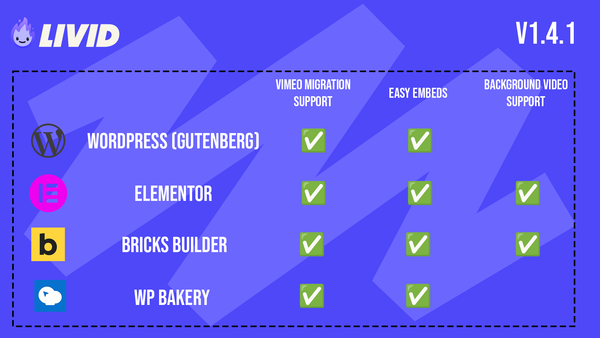
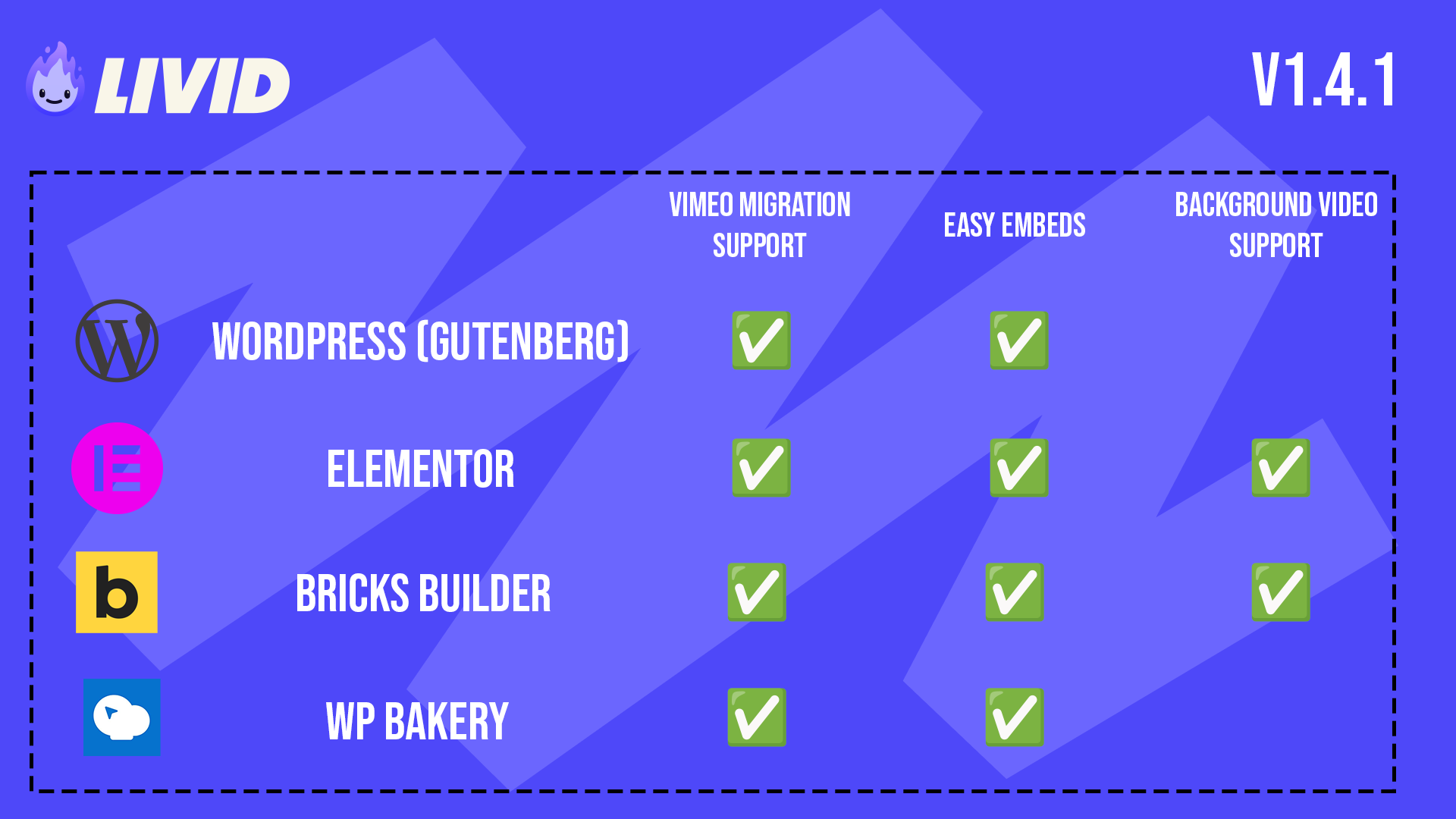
WordPress integration: Livid has a dedicated WordPress plugin that works natively with Gutenberg, Elementor, WPBakery, and Bricks. It does two things: lets you embed videos by pasting a share link (no iframe code needed), and bulk-swaps existing Vimeo embeds across your entire site. It understands each builder's content model, so it doesn't just do a dumb find-and-replace.
Player: Ad-free on every plan. Pro users get full player customisation, including removing Livid branding and uploading your own logo.
Privacy controls (Pro): Password protection, domain locking, unlisted links.
Migration: The LOVE tool (Livid One-click Video Exporter) bulk-exports your Vimeo library directly into Livid, preserving folder structure, metadata, sharing settings, and passwords. It works even without a paid Vimeo plan. If you're stuck in a Vimeo annual contract, send your invoice to support@livid.com and Livid credits the remaining time.
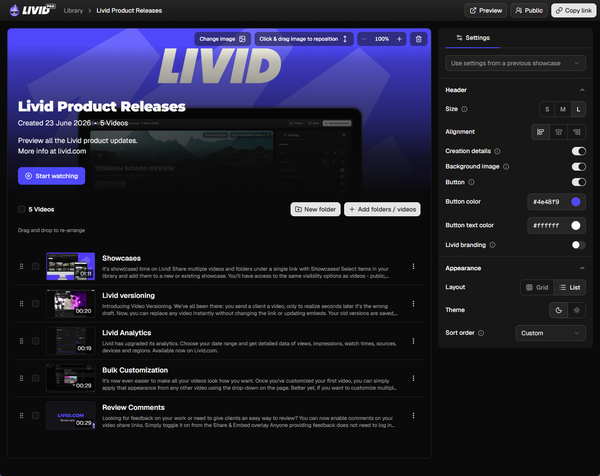
Other features: Video analytics, time-stamped comments, Showcases for sharing collections under a single link, swap-video-keep-link so you can replace a video without changing your embed URLs.
Limitations to know about: The free plan is just 1GB, which is tight. Pro maxes out at 2TB storage with no higher tier available yet. Password protection and player customisation are Pro-only. Livid doesn't position itself as an enterprise solution, and it says so explicitly.
2. Jetpack VideoPress
VideoPress is as WordPress-native as it gets, built by Automattic, the company behind WordPress.com. It integrates directly with the block editor.
Pricing: Approximately $5/month as part of the Jetpack Complete plan, or available as a standalone add-on.
Storage: 250GB. That's enough for a small library but limiting if you're producing regular content.
WordPress integration: Native Gutenberg block. No additional plugin needed. However, support for other page builders like WPBakery or Bricks is limited to standard oEmbed.
Player: Ad-free, minimal branding.
Privacy controls: Basic privacy settings through WordPress visibility options.
Migration: No dedicated migration tooling. You'd need to re-upload everything manually.
Best for: WordPress sites with a small video library that want the simplest possible setup and already use Jetpack.
3. Vimeo
Vimeo still has a good player and solid encoding. The product itself isn't the issue, the pricing restructure is.
Pricing: Creator plan at $10/month (7TB storage, 30GB private embed bandwidth cap). Professional plan at $70/month for privacy controls, player customisation, and branding removal. Enterprise pricing for accounts flagged for business use.
WordPress integration: oEmbed support works with the standard WordPress embed block. There's no dedicated WordPress plugin. You paste a Vimeo URL and WordPress renders it.
Player: Clean, ad-free. Customisation requires the Professional plan ($70/month).
Privacy controls: Password protection and domain locking require the Professional plan.
Migration: If you're moving away from Vimeo, there's no built-in tool to help you leave. If you're moving to Vimeo, you upload manually.
The real cost: If you need the features that make Vimeo useful for WordPress embedding (password protection, player branding, domain locking), you're paying $70/month. The $10/month Creator plan's 30GB private embed cap means a moderately popular site will hit the ceiling quickly.
4. Bunny.net Stream
Bunny.net is an infrastructure company that added video streaming to its CDN. It's built for developers who want granular control over delivery.
Pricing: Pure pay-as-you-go. $0.005/minute stored and $0.01/GB delivered. No monthly minimums. Extremely cost-effective for low-to-medium traffic.
WordPress integration: No official WordPress plugin. You'll embed via iframe or build your own integration. This requires more technical comfort than the other options on this list.
Player: Basic but customisable through their API. Ad-free.
Privacy controls: Token-based security and referrer restrictions available through their API.
Best for: Developers or technically inclined teams who want the cheapest possible delivery and don't mind wiring things up themselves. Not ideal if you want a plug-and-play WordPress experience.
5. Wistia
Wistia is a marketing-focused video platform aimed squarely at B2B SaaS companies. It's excellent at what it does, and it charges accordingly.
Pricing: Free plan with 10 videos and Wistia branding. Pro plan starts at $19/month for 20 videos with limited customisation. Advanced plan at $79/month removes branding and adds more analytics. Enterprise pricing above that.
WordPress integration: oEmbed support and an embed code generator. No dedicated WordPress plugin with builder awareness.
Player: Highly customisable. Strong CTA tools, email capture, and chapter markers built into the player.
Privacy controls: Domain restriction and password protection on paid plans.
Best for: B2B marketing teams running lead generation campaigns with video. If you're a course creator, freelancer, or small business, the pricing-per-video model gets expensive fast.
6. YouTube
Free. Unlimited storage. Unlimited bandwidth. Billions of potential viewers.
Pricing: $0.
WordPress integration: oEmbed. Paste a link, it renders.
Player: YouTube-branded, non-customisable. Ads appear unless the viewer has YouTube Premium. Related videos shown at the end.
Privacy controls: Unlisted links only. No password protection, no domain locking.
Best for: Maximising discovery and reach. If your goal is to rank on YouTube search and get subscribers, it's the right platform. But for embedding on your own WordPress site, the brand dilution and loss of control make it a poor choice.
Comparison Table
| Platform | Monthly Price | Storage / Bandwidth | WordPress Plugin | Player · Ad-Free · Migration |
|---|---|---|---|---|
|
Livid
Best Value
|
Free / $10 Pro | 1GB / 2TB 3TB bandwidth (Pro) |
Yes — Gutenberg, Elementor, WPBakery, Bricks | Pro only Ad-free: Yes Migration: LOVE (bulk Vimeo import) |
| Jetpack VideoPress | ~$5 | 250GB Bandwidth included |
Native block | Minimal Ad-free: Yes Migration: None |
| Vimeo | $10 / $70 | 7TB 30GB private embed (Creator) |
No | Professional only ($70) Ad-free: Yes Migration: None |
| Bunny.net Stream | Pay-as-you-go | Pay-per-minute $0.01/GB bandwidth |
No | Via API Ad-free: Yes Migration: None |
| Wistia | Free / $19 / $79 | Per-video limits Bandwidth included |
No | Yes (paid plans) Ad-free: Yes Migration: None |
| YouTube | Free | Unlimited Bandwidth unlimited |
No | None Ad-free: No Migration: None |
How the Livid WordPress Plugin Works
Most video hosts give you an embed code and leave you to figure out WordPress on your own. Livid built a dedicated WordPress plugin because embedding video on WordPress shouldn't require touching HTML.
The plugin does two things:
Easy embedding. Instead of copying iframe code, you paste a Livid share link into your page builder. The plugin handles the rest. It works with Gutenberg, Elementor, WPBakery, and Bricks using native elements registered within each builder. There's also a [livid_video] shortcode that works anywhere, including in mixed-builder pages.
Bulk Vimeo migration. The plugin scans your WordPress site for Vimeo embeds and swaps them for Livid videos. This isn't a simple URL replacement. It's builder-aware, meaning it understands how each page builder stores content. In WPBakery, it finds [vc_video] shortcodes with Vimeo links and Vimeo iframes inside [vc_raw_html] blocks. In Bricks, it works within Bricks' own content model, including background video URL controls.
The WPBakery and Bricks support was added after users pointed out that Gutenberg and Elementor coverage alone wasn't enough. Fair point, and now it's sorted.
Installation is straightforward: install the plugin from your WordPress dashboard, connect your Livid account, and you're ready to embed or migrate. The full setup process is covered in the WordPress Plugin support guide, which Livid's documentation recommends as the primary way to embed videos on WordPress.
This builder-aware migration approach is a practical differentiator. Other platforms might tell you to manually update each post. If you have 50 or 500 Vimeo embeds spread across your site, that's not realistic.
Migrating Your Existing Vimeo Library to WordPress in Bulk
If you've got an existing Vimeo library and a WordPress site full of Vimeo embeds, here's the actual workflow to switch everything without breaking a single link.
Step 1: Download the LOVE tool. LOVE (Livid One-click Video Exporter) is free and runs on Windows, Mac, and Linux. It works even if you don't have a paid Vimeo plan.

Step 2: Export your Vimeo library into Livid. LOVE connects to your Vimeo account and imports your videos directly into Livid. When importing into Livid, it preserves your folder structure, video metadata (titles, descriptions), sharing settings, and passwords. You don't need to re-organise anything.
Note: LOVE exports the optimised Vimeo versions of your videos, not the original uploaded files. For most use cases, these are identical in quality.
Step 3: Install the Livid WordPress plugin. Add it from your WordPress dashboard, connect your Livid account.
Step 4: Run the bulk embed swap. The plugin scans your site for Vimeo embeds across Gutenberg, Elementor, WPBakery, and Bricks. It shows you what it found, and you swap them all at once. Your pages now load Livid videos where Vimeo videos used to be.
Step 5: Cancel Vimeo (and get credit for your remaining time). If you're locked into a Vimeo annual plan, send your invoice to support@livid.com. Livid will credit the remaining time on your Vimeo subscription toward your Livid account. That's a real offer, not a marketing gimmick.
No other platform offers this end-to-end migration path. Most "how to switch from Vimeo" guides tell you to download each video manually and re-upload it. With a library of 100+ videos and a site full of embeds, that advice is useless.
Video Embeds and Core Web Vitals: What Actually Matters
Google's Core Web Vitals measure real user experience, and video embeds directly affect two of the three metrics: Largest Contentful Paint (LCP) and Cumulative Layout Shift (CLS).
LCP measures how long it takes for the largest visible element to render. If your above-the-fold content includes a video embed, the browser has to load the embed player, its JavaScript, its CSS, and often a preview thumbnail from a third-party domain before LCP is satisfied. YouTube's embed iframe is notoriously heavy, loading over 800KB of resources before the user clicks play.
CLS measures unexpected layout shifts. An embed that loads without fixed dimensions causes the page to jump as the player resizes itself. This is common with auto-expanding oEmbed implementations that don't set explicit width and height attributes.
There are a few approaches to manage this:
Fixed-dimension iframes prevent CLS by telling the browser exactly how much space to reserve. This is the baseline, and any embed method should support it.
Facade or lazy-load patterns show a static thumbnail in place of the actual player until the user clicks. This dramatically reduces the initial payload. Some plugins and themes implement this automatically.
Lightweight embed players matter more than people think. A player that loads 100KB versus 800KB makes a measurable difference in PageSpeed scores, especially on mobile.
Domain restriction is also relevant here. If your video can be embedded anywhere, you're paying for bandwidth on sites you don't control. Domain locking keeps your videos on your site and prevents unexpected load from unauthorised embeds.
This is also another reason self-hosting fails. Even if your WordPress host doesn't explicitly prohibit video serving in their AUP, serving large video files from your origin server adds latency that tanks your performance metrics.
Use-Case Recommendations
Different situations call for different tools. Here's a quick decision matrix based on what you actually need.
Course creators and membership sites. You need domain locking so students can't share your embed URLs, password protection for gated content, and an ad-free player that doesn't distract from the lesson. Livid Pro or Wistia. If you're choosing between them, Livid is $10/month vs Wistia's $79/month for comparable privacy features. For a deeper comparison, check this guide on the best Vimeo alternatives for course creators.
Small business product demos and marketing videos. You need branding removal so the player matches your site, basic analytics to see what's getting watched, and affordable pricing that doesn't penalise you for success. Livid Pro covers all of this at $10/month. More on this at video hosting for small businesses.
Creative portfolios and client delivery. You need a clean player, the ability to group videos into collections for client review, and time-stamped comments for feedback. Livid Pro with Showcases handles this well. More at video hosting for creatives.
Developers who want pay-as-you-go pricing. Bunny.net Stream. You'll do more setup work, but the per-GB pricing is hard to beat if you're comfortable with APIs and custom integrations.
Maximum reach and SEO discovery. YouTube, but with an important caveat: upload to YouTube for discovery and link to your YouTube channel from your site. Don't embed YouTube on your WordPress pages. Use a proper video host for that.
Budget of zero, minimal needs. Livid's free tier gives you 1GB of storage with no credit card required, no ads, and full access to the WordPress plugin. It's small, but it's enough to embed a handful of videos without paying anything.
FAQs
Can I host video directly on WordPress?
Technically yes, but practically no. WordPress lets you upload video to the media library, but your hosting provider likely prohibits serving large media files (check your AUP), you won't get adaptive bitrate streaming, your backups will balloon in size, and your Core Web Vitals will suffer. Use an external video host and embed on your WordPress site instead.
Does YouTube embedding affect SEO?
It can, in two ways. First, YouTube's embed iframe is heavy and can hurt your Core Web Vitals scores, particularly LCP on mobile. Second, YouTube sets tracking cookies that require GDPR consent handling. If you're not managing cookie consent for YouTube embeds, you have a compliance gap. The video itself won't hurt your SEO, but the delivery method might.
What happened to Vimeo's pricing?
After Bending Spoons acquired Vimeo, the plan structure was overhauled. Legacy plans like Plus, Starter, and Standard are being forcibly migrated. The biggest impact: Plus users ($10/month) are being moved to the Professional plan ($70/month), a 670% increase. The $10/month Creator plan exists, but it caps private embed bandwidth at 30GB and lacks privacy controls and player customisation. See the detailed breakdown above.
How do I switch from Vimeo to WordPress without breaking links?
Use the LOVE tool to bulk-export your Vimeo library into Livid (preserving folders, metadata, and privacy settings), then install the Livid WordPress plugin to bulk-swap all Vimeo embeds on your site. The plugin works across Gutenberg, Elementor, WPBakery, and Bricks. Your page URLs stay the same; only the video source changes.
Is there a free WordPress video hosting option?
Yes. Livid offers a free tier with 1GB of storage, no credit card required, and no ads on the player. You get access to the WordPress plugin for embedding, bulk Vimeo import, video analytics, time-stamped comments, and swap-video-keep-link. 1GB is limited, but it's enough to test the workflow or host a small number of videos at zero cost.
Can I use Livid with WooCommerce?
Yes. Livid embeds work anywhere on a WordPress site, including WooCommerce product pages, landing pages, and custom post types. If you can paste a link or add a block, you can embed a Livid video.
Start Hosting Video on WordPress the Right Way
If you're starting fresh: sign up for the free plan (1GB, no credit card) and install the Livid WordPress plugin to start embedding in minutes. Paste a share link, and your video shows up in whatever builder you use.
If you're migrating from Vimeo: download LOVE to bulk-export your entire Vimeo library into Livid, then use the WordPress plugin to swap every Vimeo embed across Gutenberg, Elementor, WPBakery, or Bricks. If you're stuck in a Vimeo annual plan, send your invoice to support@livid.com and we'll credit the remaining time toward your Livid account.
Livid Pro is $10/month for 2TB storage and 3TB bandwidth. No forced enterprise upgrades. No 670% price hikes. Just video hosting for your WordPress site that works the way it should.